Final Scores
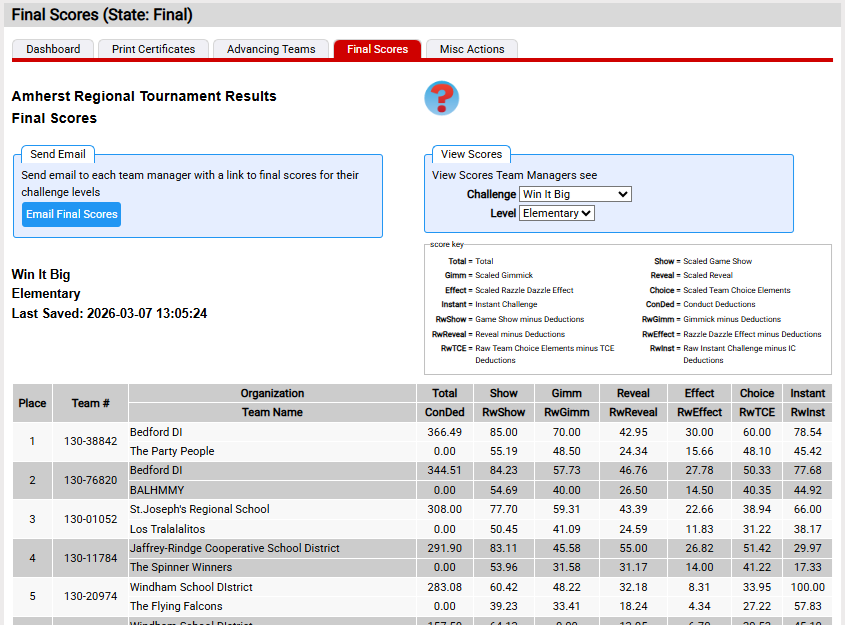
Final Scores page reviews the final scores for a tournament and can be used to email a link to each team manager at your tournament that will let them see these final scoring details for their teams.
This feature can be found in the Final Scores red tab of Tournaments=>results.
The first consideration around this feature is when to send such email. You likely don't want to email the final scores until after the Closing Ceremonies for your tournament. To assist in not sending this information too soon, the page only works if the tournament is in the final state.
This page is a web-based version of the traditional Hall of Scores where the score room posted the same information. Team managers could visit the Hall of Scores to see how their team ranked in the team's challenge-level.
In addition to emailing team managers a link to view final scores, the page let's you see the information the team manager will see. This can be useful if you need to provide a further explanation. The page lets you select any challenge-level (View Scores area) to view the results. In a traditional Hall of Scores, people where present in the room to help team managers understand the numbers they are viewing. You may need to do this.
An example of what a team manager will see when clicking on the link in their email is found here along with a some guidance on interpreting the information displayed.